Anime Ascendants Redeem Codes in the Lobby
NPC ring method and Codes button method, plus the errors that actually matter.
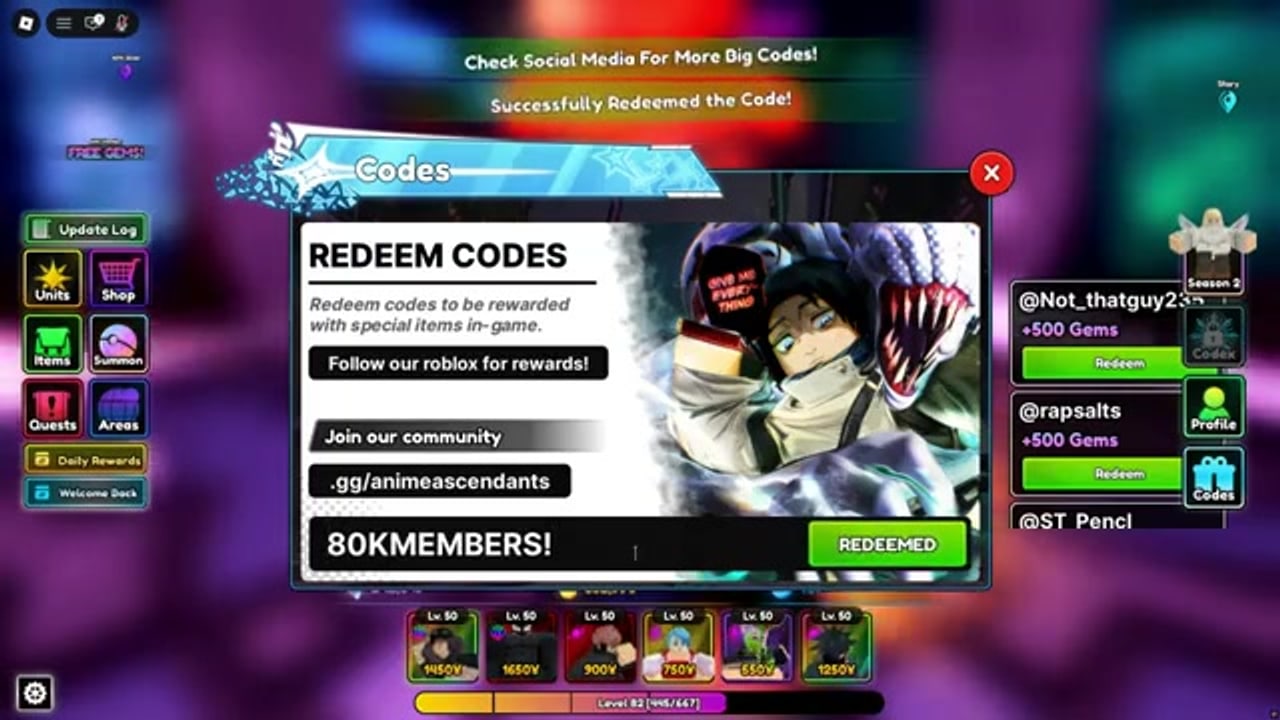
Redeeming in Anime Ascendants happens in the lobby, not mid-wave. You can claim on desktop or mobile, in a public 16-player server or a quieter instance. You do not need to ready up, place a unit, or spend Robux. If you can move your avatar after loading into experience 15601725874, you can open the codes UI.
There are two working paths: walk into the Codes NPC ring, or tap the Codes button on the HUD. Use whichever is faster on your device. Mobile players usually win with the button. Desktop players who already walk past the Naruto figure can redeem without opening extra menus.
This page is the click path. The live string list lives on the Codes Hub. Dead historical strings live on expired codes. Do not mix those three jobs.
Method 1: Codes NPC (Naruto figure)
- Launch Anime Ascendants from Roblox and wait until the lobby finishes loading. If you are staring at a match UI, you already left the lobby — leave the match first.
- Stay near spawn. Look for a Naruto-style figure standing in a marked ring with a Codes label over the head or on a sign beside the ring.
- Walk straight from spawn, then adjust left or right until the camera catches the sign. Lobby furniture has moved since the Special Anime Defense rework, but the NPC still sits near the spawn cluster rather than inside Challenges.
- Step into the ring. You do not always need a separate interact key; entering the circle is enough on most sessions.
- When the panel opens, click the field that reads something like
Type Code Here. - Paste one code. Do not chain two codes in one box.
- Press Redeem.
- Watch for the shake and the reward toast. If nothing happens, the field is still focused — tap Redeem again once, not ten times.
If the ring does nothing, you are probably clipping the edge of the circle, sitting in a emote, or standing on a different lobby prop that looks similar in a crowded 16-player server. Back up, jump in from the front of the sign, and try again.
Method 2: Codes button (bottom-right / right side)
- Load the lobby.
- Look at the bottom-right corner of the screen. Some layouts pin a Codes control on the right edge instead of the true corner. On phones, rotate to landscape if the HUD is stacked and the button is under the chat.
- Tap Codes. The same text field used by the NPC should appear.
- Paste the string exactly, then Redeem.
- Close the panel and open it again if you have a second code. Clearing the field between claims avoids concatenating
BLUEBERRY2!4thFixedinto garbage.
This method is the one to teach new mobile players. Camera control in a busy lobby is worse than missing a HUD button by two millimeters.
Paste rules that actually fail codes
Anime Ascendants codes are case-sensitive. happy4th is not Happy4th. blueberry2! is not BLUEBERRY2!. Copy from the Codes Hub table instead of typing from memory.
Other failure modes:
- Leading or trailing space from a messy copy.
- A hashtag that an older article added (
#BLAMEHORIZONAOE) when the live string isBLAMEHORIZONAOE. - A bonus exclamation mark (
BLEACHCOMINGTOYOUSOON!) when the hub lists none. - Two codes in one field.
- Redeeming inside a match instead of the lobby.
- Redeeming on a lookalike experience that is not place 15601725874.
If the UI says the code is invalid, fix the spelling once. If it still fails, it is expired, already claimed on this Roblox account, or gated on level. It is not a hidden second syntax.
Level gates, especially level 3
Several reported September 2026 codes, including BLUEBERRY! and BLAMEHORIZONAOE, are listed as level 3. The game will reject them on a fresh file even when the spelling is perfect. That is not a region lock and not a mobile bug.
Level 3 is a short getting started session. Queue easy story mode acts, place whatever units you have, and finish the maps. Then return to the lobby and redeem. Do not sit in the ring for twenty minutes hoping the level check goes away.
If you are already level 3 and still see a level error, you grabbed the wrong code from an old screenshot that had a higher gate (some 2026 apology codes used level 4 or 5). Drop that string and use the current hub table.
What the error text usually means
The lobby is not verbose, but the patterns are stable:
| What you see | Likely cause | What to do |
|---|---|---|
| Invalid / does not exist | Typo, extra symbol, or expired | Compare to the hub; then check expired |
| Already redeemed | This account claimed it earlier | Stop; codes are one-per-account |
| Level too low | Gate (often 3) | Play story, then retry |
| Nothing at all | Field not submitted, or stale lobby | Click Redeem once more, or rejoin the experience |
| Rewards toast | Success | Check currencies before you queue |
A stale lobby is real. Staff can publish a code without recycling every server. If a brand-new Discord string fails on an instance you have idled in for an hour, leave to Roblox home, join Anime Ascendants again, and redeem once on the fresh lobby.
Private servers are not required. They are only a quieter room if public spawn is so crowded you cannot see the NPC. The Codes button ignores crowd density.
Where the rewards land
Successful redeems credit the account immediately. You should see Gems, Coins, Magic Tokens, Trait Rerolls, Stat Cubes, and Perfect Stat Cubes jump in the lobby currency cluster. They do not go to a mailbox you have to open, and they do not wait until you finish a match.
If the toast lists items and the counters do not move, wait a second for the HUD to refresh, then open inventory. Cubes and rerolls can sit with items rather than the top gem counter. Do not re-redeem. The second attempt will just throw already-claimed.
Spend order after a large toast:
- Gems: banner summons if you still need a carry. See best units before you dump a 10k stack into a banner you do not understand.
- Trait Rerolls: only on the unit you actually place. Use how to reroll traits and the trait planner.
- Perfect Stat Cubes: same keeper unit.
- Coins: the next map’s placement curve, especially if you still stall early waves.
- Magic Tokens: the token banner, not impulse shop cosmetics.
Desktop vs mobile quirks
On desktop, Ctrl+V into the field is reliable. Click the field first. If you paste while chat is focused, the code goes to world chat and the redeem box stays empty.
On mobile, long-press paste. The Roblox on-screen keyboard loves to insert a trailing space. Delete the last character and retype it if a code that looks correct still errors. Landscape mode makes the Codes button easier to hit without opening emotes.
You can redeem on either platform and keep playing on the other. The grant is on the Roblox account, not the device.
After you claim everything on the hub
Close the panel. Screenshot your currencies if you are about to spend rerolls so you know the before/after. Then leave the codes UI and go play. Sitting in the ring does not make the next code spawn faster.
New strings still appear around patches and apology notes. Watch updates for the patch, then the official Discord for the actual code. The old Special Anime Defense Trello is not a redeem tool anymore.
If you came here from a video and the on-screen code is RELEASE, DELAYASC, or 10mil, stop. Those are archive bait. The expired list exists so you do not burn five minutes on a 2024 milestone string while a live blueberry code is sitting on the hub.
Frequently Asked Questions
Quick answers for codes, traits, summons, and story progress.
Do I redeem codes in a match or in the lobby?
Lobby only. Use the Naruto Codes NPC ring near spawn or the Codes button on the bottom-right / right side. Leave the match if you are already in a wave.
The Codes button is missing. What now?
Walk into the NPC ring under the Codes sign. If both are gone, you are probably in a match, a minigame UI, or the wrong experience. Rejoin place 15601725874 and stay in the lobby.
I pasted the code and nothing happened.
Does redeeming on mobile give the same rewards as PC?
Yes. Grants are on the Roblox account. Desktop and mobile share the claim, and a second device cannot take the same code again.
Where do Gems and Trait Rerolls appear after a success toast?
Immediately on the account. Check lobby currencies; cubes and rerolls may sit with items. Do not redeem twice. Plan the spend with the trait planner if the toast included rerolls.
Why do some codes say I need a higher level?
A few reported codes, including `BLUEBERRY!` and `BLAMEHORIZONAOE`, list a level 3 gate. Play early story until you hit the requirement, then redeem in the lobby.